Coordinate frames
This page defines the frame the pose data lives in: where the world frame is, which way it points, and how to tell during collection whether the poses are right. Both configurations take their poses from the same Pico4U headset and trackers, so the frame definition is identical; only the interface for looking at poses differs, and that part is split into "Backpack Kit" / "Developer Kit" tabs.
The world frame
The world frame is established and frozen by XTac UMI XR on the headset at the moment it starts. It is right-handed and gravity-aligned:
| Axis | Direction |
|---|---|
| Origin | Where the headset was at the moment XTac UMI XR first started |
| X axis (red) | The device's forward direction, along the normal of the headset's front camera mounting face |
| Y axis (green) | The device's left, orthogonal to X, fixed by the right-handed convention |
| Z axis (blue) | The device's up, orthogonal to both X and Y, determined uniquely by the right-hand rule |
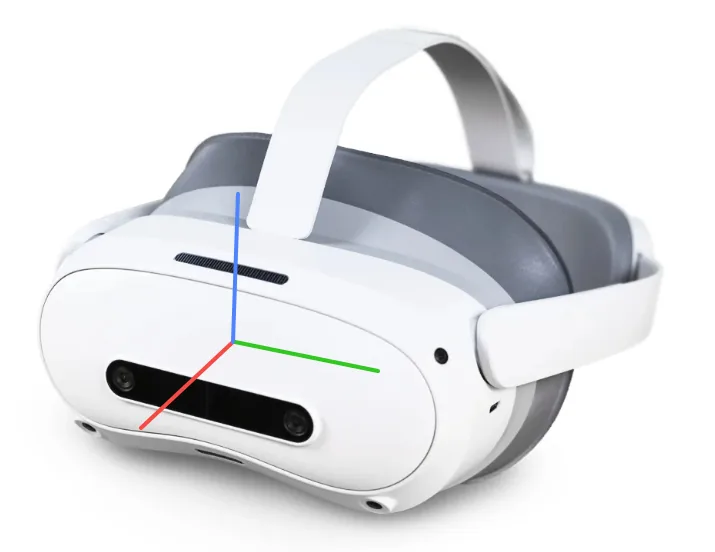
The frame follows the headset only at the instant it starts; once frozen it is fixed in space, and turning your head or walking around does not carry it along. Restarting XTac UMI XR establishes a new frame, changing both the origin and the orientation. So face the same direction as the robot (towards its front) when you start it, so that the X axis lines up with the robot's forward direction, and do not restart it while collecting one dataset; the steps are in Startup and frame alignment.
Every pose in a dataset is referenced to this world frame: the Developer Kit writes the end-effector TCP pose tcp.x/y/z plus the 6-D rotation r1..r6 (the first two columns of the rotation matrix, with the convention in What each frame records); the Backpack Kit records the headset's and the trackers' poses in the MCAP. The Backpack Kit's exported data has its own origin, described in the next section.
Origin of exported data (Backpack Kit)
From XTac UMI Collector 0.4.6, the poses in state and action in the Backpack Kit's exported LeRobot datasets and training MCAPs no longer use the world frame above directly; instead each episode is relative to the headset at the moment it started recording:
| Axis | Direction |
|---|---|
| Origin | The headset position at frame 0 of the episode (worn around the neck, that is the headset at the chest) |
| X axis | The headset's horizontal heading at frame 0 |
| Y axis | Left, orthogonal to X |
| Z axis | Vertically up |
- Why: before every recording the device has the headset reset its world frame, but Pico only zeroes the heading and height; the horizontal position can still be off by a few centimetres to tens of centimetres. Anchoring each episode to the headset at its start gives every episode in a dataset the same starting point, independent of that residual and of restarts of XTac UMI XR.
- The transform: translate to the frame-0 headset position, then rotate about the vertical axis to the headset's horizontal heading at that moment. Only translation and yaw are removed; the headset's pitch and roll are kept. It is a rigid transform, so the distance and relative orientation between the hands are unchanged. At frame 0 the headset position is 0 and its yaw is 0.
- Face forward when you start: an episode's X axis is the headset's horizontal heading at the moment recording starts, so face straight towards the work area when you start. The starting-pose check uses the same frame.
- Scope: only exported state and action. Raw recordings on the backpack, playback and the live view still use the world frame from recording time;
meta/xumi_collection_devices.jsonstores each episode's anchor (its position, yaw and time in the recording frame), so you can convert back if needed. - "Dual gripper" mode: it records no headset pose, so exports skip this transform.
- Developer Kit: unaffected; it still uses the world frame above.
The pose view during collection
The pose view on the console's "Live monitor" page shows the left and right grippers' and the headset's poses live, with the left and right gripper opening angles below it (rad / deg / percentage open). A closed gripper reads about 0.02rad, and a little more force brings it to zero. Before recording, shake each gripper in turn and confirm that the left and right poses each follow it; if one does not move or jumps around, check the tracker binding and whether the view is obstructed.
--display_data=true opens a /world 3D view in Rerun: each gripper is drawn as a labeled ellipsoid with a triad at its live tcp.*, trailing a breadcrumb trajectory.
- The scene is declared
FLU, the initial viewpoint faces +X, and the world axes are labeled+X forward / +Y left / +Z up. - The breadcrumb keeps the most recent 90 samples (about 3 seconds at 30fps), fading with age.
- With the headset camera on, the headset is drawn into the same
/worldas a smaller amberHEADmarker, without a trajectory. --show_trajectoryis on by default andfalseturns it off; it is skipped automatically when--robot.enable_tracker=false.- With the gripper lying flat, the EE marker should sit at the midpoint between the fingers with the triad reading X forward / Y left / Z up; if not, the tracker is mounted incorrectly.
- The
tracker posein the scalar panel is the tracker's raw pose, for inspection only; what is written to disk istcp.*.
Local frames
The three axes of the headset's own body frame follow the same convention as the world frame: X forward (along the normal of the front camera mounting face), Y left, Z up, right-handed.
The gripper's local frames, end-effector (EEF) definition, tracker mounting position and follower flange interface are defined in XTac-UMI-Description (URDF / MJCF / USD and a frame specification). The tcp.* the Developer Kit writes is the gripper tip under that definition; to customize it, see RobotConfig options.